
Where did my agents go?
How the new Copilot home changes where you find agents, notebooks and skills
The first time I opened the new Copilot interface, I liked what I saw. A cleaner layout, a calmer start screen and a look that reminds me of the AI chat apps many people already use. Then I went looking for my agents.
They were no longer where I expected them. Since October, Chat and Cowork share one new Home in the Frontier program, and a few things moved to make room for that. Agents, notebooks and skills all ended up in a different place or under a different name.
In this blog I want to walk you through what changed, what I find confusing, and what it means for the colleagues who will open Copilot one day and wonder where everything went.
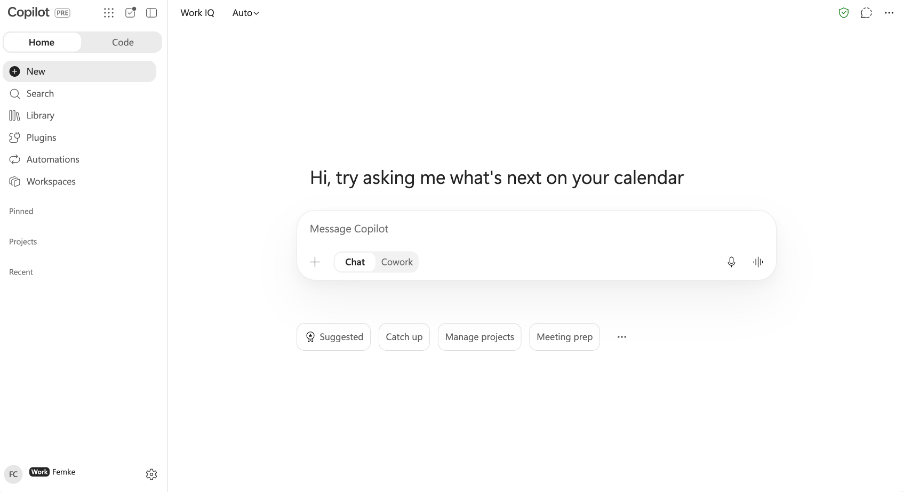
One home for Chat and Cowork
The biggest change is the starting point. Chat and Cowork used to feel like two separate places. In the new Home they sit side by side, and Automations has moved in as well. You start in one place and choose how you want to work: ask a quick question, or hand over a task that takes multiple steps.
Microsoft’s own message center post describes this as a rollout to Frontier in October. I have not found a firm date for that wider rollout, so for now I treat this as a preview of what is coming.
Agents now live under Plugins
This is the part that caught me off guard. In the left navigation, the standalone Agents entry has been replaced by one combined place for agents, skills and connectors. That idea makes sense to me but the naming, unfortunately, does not (at least not yet).
The first time I opened the new interface, this section was called “Invoegtoepassingen” in my Dutch environment (or “Plugins” in English). After that it became “Agents & Plugins”. Today it is called “Invoegtoepassingen” (or “Plugins”) again. Since this is still Frontier, I assume Microsoft is still looking for the right label. As an early adopter I can live with that. For a colleague who just learned where to find agents, it is one more thing to relearn, and a name that keeps changing makes it hard to build a habit.
Something similar applies to Researcher and Analyst. They are no longer pinned by default in the navigation. You can still reach them through the same section and pin them yourself, and admins can pre-pin them for the whole organization. If your users rely on these agents, that is worth deciding before the new layout lands.
Notebooks are now Workspaces
Notebooks has been renamed to Workspaces. I will be honest, another new name did not help my sense of orientation. At the same time, I like the thought behind it. A workspace sounds like a place where a team brings its information together, and that fits much better with how people actually work than a notebook that mostly feels personal. I am curious how this develops, and I plan to test it more in the near future.
Building skills in regular Chat
The change that matters most for daily work is that you can now create skills in the regular Copilot Chat. A skill is a reusable set of instructions that tells Copilot how to handle a specific task. You describe what you want in natural language, Copilot asks a few questions, and you end up with a skill you can reuse.
I found out about this in a slightly unexpected way. The day before an internal training on skills, I tried to build one in Chat and it did not work. I had seen the announcement, so in the training I told the group it was coming soon. During the live demo, it suddenly worked. That is Frontier in a nutshell: features appear in your tenant without warning.
The skill I built that day was a quote checker. It worked really well, and it showed me how low the barrier has become. You do not need a separate environment or any technical knowledge. A task you repeat every week, with a structure you want to keep consistent, is a good candidate. Think about checking quotes, structuring a weekly update or rewriting a customer email in your own tone.
Code: building a small app by describing it
Code is the newest Frontier addition to the new Home. You open it from the left navigation, describe what you want in plain language, and Copilot builds it. Microsoft positions it for trackers, dashboards, small apps and workflows, aimed at people who would never open a development environment themselves. Copilot asks clarifying questions along the way and uses your work context to shape the result.
I tried it myself by building a small app where participants of a training can leave feedback in a fun way. It worked well, and a first version was ready quickly. That part is easy to be enthusiastic about.
The questions start after the building. Where does the app run? Who is allowed to use it? Who owns it when I am on holiday? Which data does it touch? A feedback app is nice, but to let participants actually use it, it needs somewhere to live. Microsoft’s answer is Copilot Managed Runtime, a hosting environment inside your Microsoft 365 tenant that is currently in public preview. You publish your project there and share it with colleagues, and access to the underlying data still depends on their permissions.
I like that this question has an answer, and I think it is the right question to ask early. Vibecoding makes the first version of an app very quickly. Governance, publication and ownership are what remain, and those questions belong to the organization as well as to the person who built the app. Admins can also set spending policies for Code, so it is worth deciding who may build before people start. I have not tried this yet, but it sounds promising.
Chat, Cowork and Code: what costs credits?
Everyday work in Chat and the Microsoft 365 apps stays covered by the Copilot license. Cowork and Code run on usage-based billing with Copilot Credits.
At the same time, Chat keeps getting better, and with skills it can take over a part of what you previously needed Cowork for. For adoption that is good news. People can start in Chat, build and refine their skills there at no extra cost, and move to Cowork or Code when a task needs more steps or a real app.
What I would do as an organization
If this layout is coming to your users, I would send a short heads-up before it arrives. Tell people that the navigation will look different, where they can find their agents, and what the section is called at the time of rollout. Decide with your admins which agents you want pinned by default. And pick one small, repeatable task and let people build a skill for it, so the first experience with the new interface is a useful one.
Closing thoughts
What I like about this update is that the interface starts to match how people want to work: one place to begin, with the choice of how far Copilot goes. What I find less convenient are the names that keep changing. Until they settle, clear communication matters more than the feature list.
As with most Frontier features, things can still change. Try it in your own context and see which small task you would turn into a skill first.
