
Skills in PowerPoint: a first look at what’s available with Anthropic Models
A new feature is making its way into Copilot in PowerPoint: Skills. When Anthropic models are active, you will soon start to see a new section appear in the Copilot sidebar with pre-built, reusable workflows you can run with one click.
In this blog, I want to take a closer look at what Skills are, where you find them, and what they look like in practice based on two examples I tried in my own environment.
What are Skills in Copilot?
Skills are pre-built, reusable workflows that you can run with a single click from the Copilot sidebar. Instead of writing a detailed prompt every time you want Copilot to do something specific, a Skill packages the instructions, structure and rules in advance.
In PowerPoint, Skills become visible when Anthropic models are active in Copilot. You can access them by clicking the brain icon in the Copilot panel, or by typing a forward slash in the chatbox to see the available options.

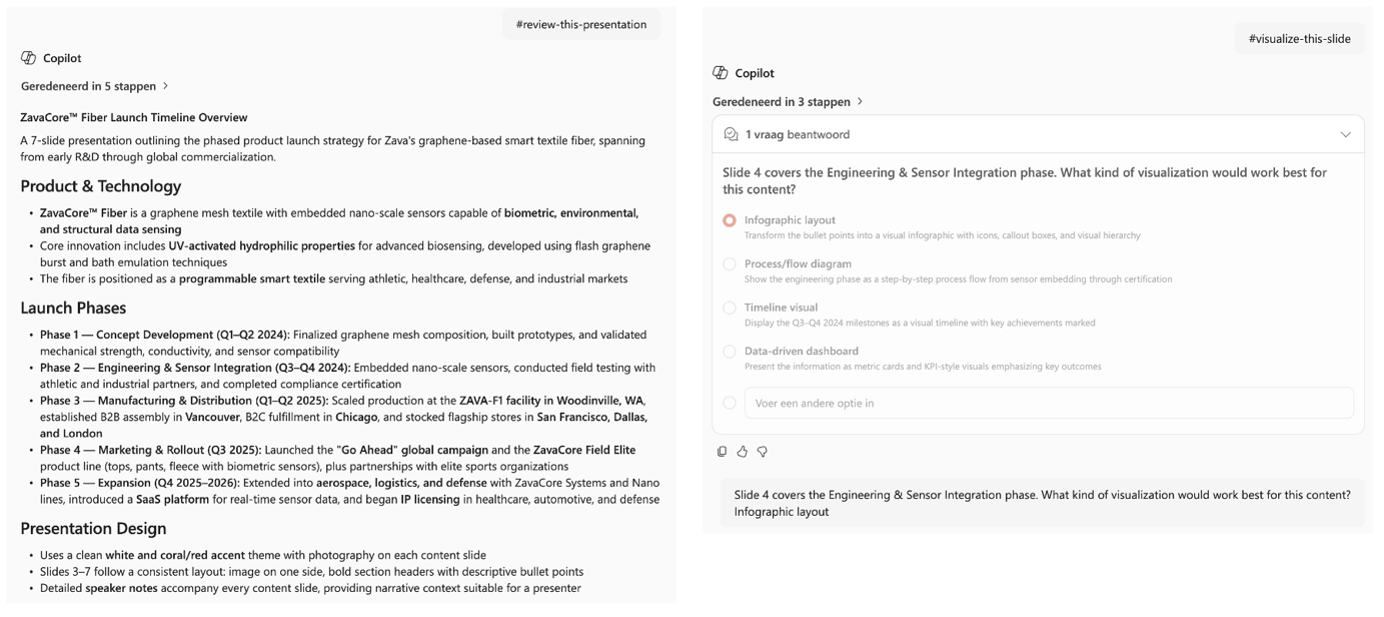
The two Skills I want to share are review-this-presentation and visualize-this-slide. Both are currently in preview but already give a good sense of where this is heading
Review-this-presentation in practice
I tested this Skill on a presentation called ZavaCore Fiber Launch Timeline Overview. The Skill understands the content of the deck and generates improvement briefs with the aim of giving you actionable feedback rather than a generic summary.
What I appreciated most is that it does not only look at design or layout. It also reviewed the speaker notes, the overall clarity of the storyline and the consistency of how information is presented. That makes it feel more like a structured review by a colleague than a quick scan by an AI.
For me, this is exactly the kind of feedback that often gets skipped when you are working on a deck under time pressure. You finish the slides, you rehearse the story, but you rarely sit down to evaluate whether everything still hangs together. A Skill like this lowers the threshold for that final review step.
Visualize-this-slide in practice
The second Skill I tried is visualize-this-slide. The idea is that you select a specific slide and ask Copilot to improve it visually.
What I liked is that it did not immediately start making changes. It first asked me a few questions to better understand what I wanted to see. That short clarification step makes the result feel more intentional and reduces the risk that you end up with something completely off.
The output stayed within the existing template, which is something I always pay close attention to. Brand consistency matters, and AI features that ignore corporate styling quickly lose their value in real organizations. The visual itself was nicely done.
The one downside is the loading time. The change took quite a while to appear on the slide, which makes it less suited for quick iterations. For a deeper redesign of a single important slide, it works well. For rapid back-and-forth across multiple slides, the wait becomes noticeable.
Good to know
A few practical considerations to keep in mind:
- Skills in PowerPoint are currently in Preview, so behavior and availability may still change. The release date is still unknown.
- They are only visible when Anthropic models are active in Copilot.
- An admin needs to have Anthropic enabled as a Microsoft subprocessor in the tenant.
- Availability can depend on your specific tenant configuration and admin settings.
Closing thoughts
What I find most interesting is not the individual Skills themselves, but the fact that they are now appearing inside the Office apps. It signals a different way of working with Copilot. Less open prompting, more structured one-click actions that codify a way of working.
There is still room for improvement, especially around performance and the breadth of available Skills. But for a Preview feature, it already shows a lot of potential. And as always with Copilot, the real value only becomes clear once you try it on your own work.