
Managing Agent Identity, Access & Accountability – Part 4
Agents tend to change over time as usage patterns, integrations, and business context evolve — even when the underlying model remains unchanged.
Lifecycle management spans the full life of an agent, from creation through retirement, with defined checkpoints along the way. It provides a structured way to manage these changes in a predictable and reviewable manner. This ensures that agents remain purposeful, have clear ownership, and are aligned with how they are being used.
In practice, this means having clarity on when agents are created, how they evolve, who owns them at each stage, and when they should be reviewed or retired.
Since our earlier blog on orphaned agents, several platform updates have changed how agent lifecycle management can be implemented in practice. These updates improve visibility, ownership, and traceability across the agent lifecycle.
These updates strengthen lifecycle management by making existing practices easier to apply consistently.
Improved Visibility into Agent Inventory
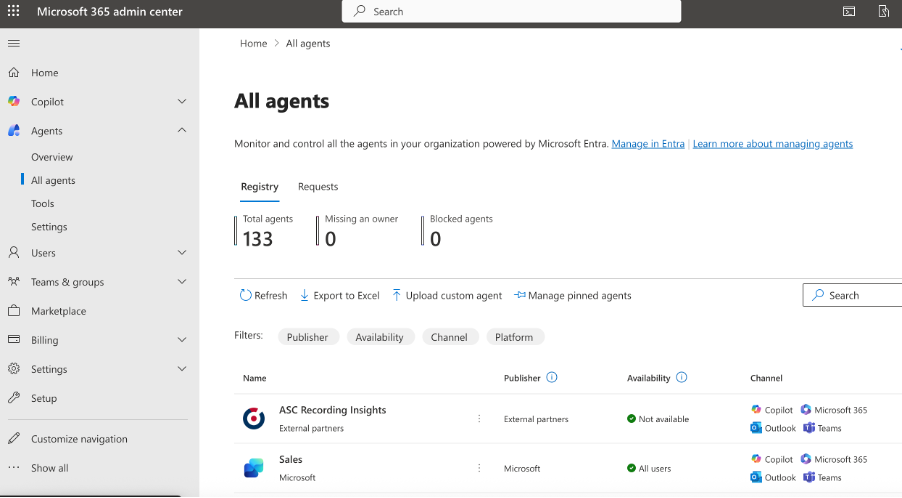
Recent updates introduce clearer ways to discover and inventory agents across the tenant. This reduces the likelihood of agents continuing to operate beyond their lifecycle, simply because they are hard to find.
Improved discovery makes it possible to include agents in regular reviews instead of managing them only when issues arise.
Improved visibility supports:
- Identifying inactive or unused agents
- Understanding where agents are deployed
- Linking agents back to owners and teams
Administrators can gain visibility into their organization’s agent estate across:
- Microsoft Entra Agent Registry
- Microsoft Agent 365
- Microsoft Purview DSPM
- Microsoft Teams Admin Center
- Microsoft Defender Assets
Actionable guidance: Periodically review the full list of agents in your environment and reconcile it with documented ownership and business purpose.
Agents as Identifiable Actors in the Microsoft Environment
Microsoft has introduced support for treating agents as identifiable actors within the tenant with Microsoft Entra Agent ID. In practice, this means agents can be assigned their own identities that participate in existing identity, access, and audit mechanisms.
Treating agents this way aligns them with existing enterprise identity practices rather than managing them as special cases.
This enables:
- Applying access controls directly to agents
- Auditing agent actions independently of the human creator
- Managing agent ownership / sponsorship changes with Microsoft Entra ID Governance Lifecycle Workflows
By giving agents an identity, lifecycle events such as access reviews, permission changes, and decommissioning become more concrete and enforceable.
Actionable guidance: Ensure each agent in the environment is associated with a distinct identity and configure Entra ID governance to include that identity in regular access and ownership reviews.
Better Visibility into Agent Activity
Updates to security and compliance tooling improve observability into how agents interact with data and systems over time. This helps surface behaviour changes that may not be obvious during initial deployment, helping to manage the agent’s lifecycle.
Ongoing activity visibility helps teams understand how agents are being used over time, not just how they were designed to be used.
Greater activity visibility helps teams:
- Detect drift from original intent
- Identify agents interacting with sensitive data
- Support audits and investigations
Administrators can find visibility into agent activity across:
- Microsoft Purview Audit Log
- Microsoft Purview DSPM
- Microsoft Defender Incidents & Alerts
And many more.
Actionable guidance: Review agent activity signals as part of ongoing governance, especially for agents with broad data access or operational impact.

Closing Thoughts
Taken together, these updates help swiftly identify ownerless agents, manage agent lifecycle workflows, and improve agent activity visibility. Lifecycle management becomes easier to operationalize, enforce, and manage.
What Comes Next?
In our next and final blog of the series, we’ll explore:
- Operationalizing Agent Governance in Your Workflows