Building Production Ready AI: A Practical Azure Approach
There’s a big difference between getting an AI prototype to work and getting it to run reliably in production.
Recently, I worked on an AI solution that analyzes damage from photos using a relatively simple Azure architecture.
What stood out wasn’t any single technology. It was how these services worked together—and the engineering decisions around them—that turned an AI capability into something we could actually ship.
At a high level, the workflow looked like this:
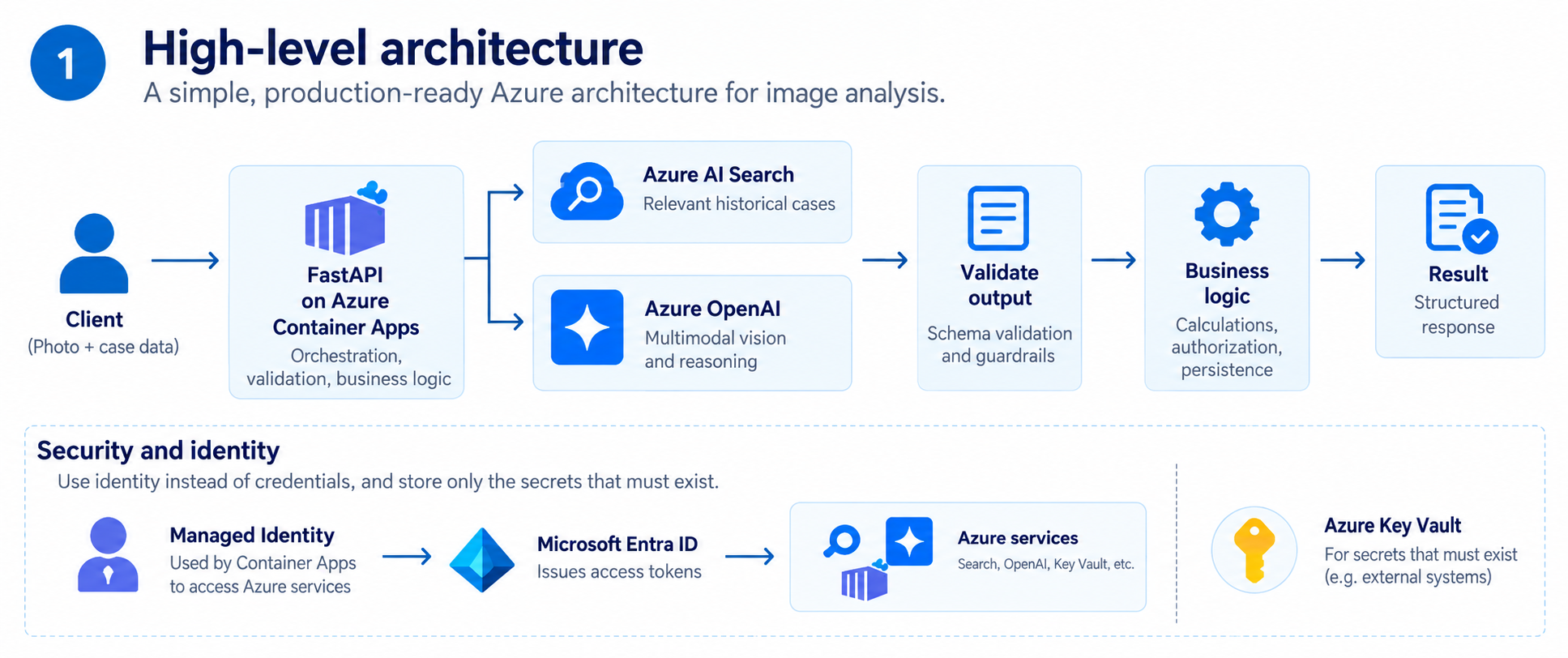
Figure 1. High-level architecture and identity flow.
Azure OpenAI: Treating the model as one component
Azure OpenAI handled the multimodal vision and reasoning.
Instead of training and hosting a custom computer vision model from scratch, I could send the image together with instructions and relevant domain context to a multimodal model.
But the model call itself was the easy part.
The more important challenge was making the output predictable enough for the rest of the application to consume.
Instead of relying on free-form text, I structured the expected response around fields such as:
{
  "damage_type": "dent",
  "severity": "moderate",
  "affected_area": "rear_left_panel",
  "confidence": 0.87,
  "evidence": [
    "visible deformation around wheel arch"
  ]
}
The API could then validate the response before using it downstream.
This separation is important.
The model handles interpretation and reasoning. Deterministic application code handles validation, calculations, authorization, persistence, and business rules.
If a decision can reliably be expressed in code, it usually shouldn’t be hidden inside a prompt.
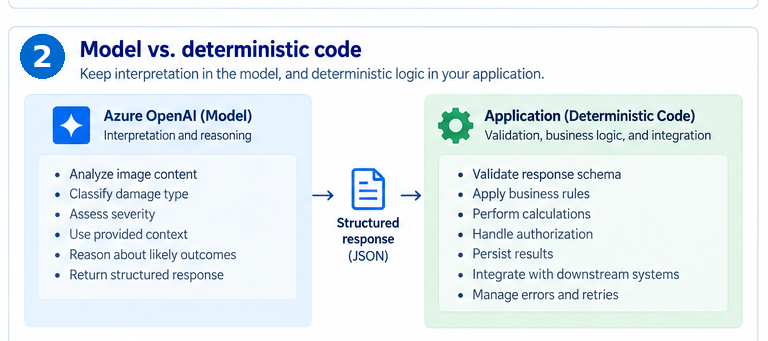
Figure 2. Keep model reasoning separate from deterministic application logic.
Azure AI Search: Retrieval is more than “adding RAG”
A general-purpose model may understand what damage looks like, but it doesn’t automatically know an organization’s historical cases, terminology, processes, or previous outcomes.
That’s where Azure AI Search added significant value.
Historical cases could be indexed with information such as descriptions, embeddings (text and photos), damage categories, asset types, repair information, outcomes, and other domain-specific metadata.
When a new case arrives, the application retrieves relevant historical cases before calling the model.
And this is where retrieval design starts to matter.
Vector search can find semantically similar cases even when the wording is different. Keyword search can help when exact component names or domain-specific terminology matters. Metadata filters can narrow the search space before ranking results.
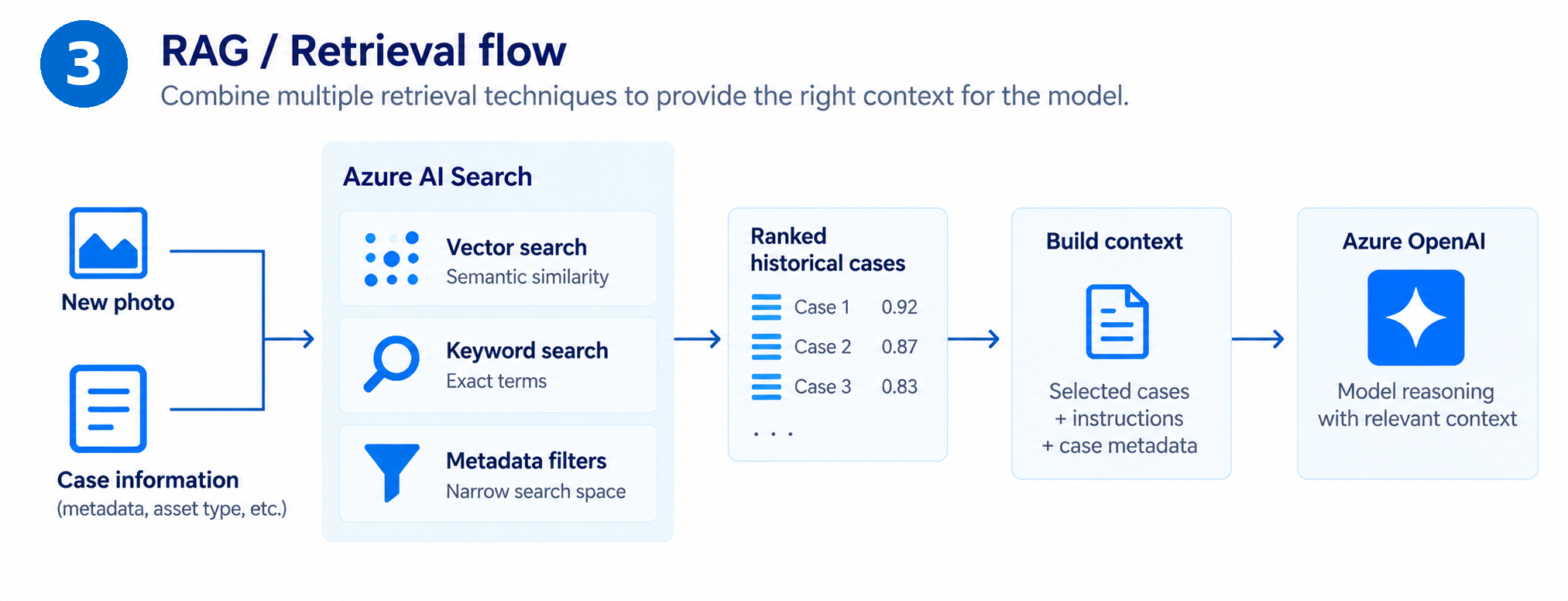
Figure 3. RAG retrieval flow using vector, keyword, and metadata signals.
The important lesson is that RAG quality depends heavily on retrieval quality.
A powerful model given irrelevant context can perform worse than a simpler model given the right context.
Production RAG is more than vector search. It requires hybrid retrieval, metadata filtering, relevance ranking, and careful context selection.
Indexing, chunking, ranking, top-k, and similarity thresholds determine which retrieved information reaches the model.
Azure Container Apps: Keeping the runtime simple
The application itself ran on Azure Container Apps.
FastAPI exposed the API, while the container handled orchestration between image processing, retrieval, Azure OpenAI, validation, and business logic.
A typical request validates the image, retrieves relevant cases, calls Azure OpenAI, validates the response, and applies business rules before returning the result.
Keeping the API stateless made horizontal scaling much easier.
No request depended on memory stored inside a particular container instance, so replicas could be added or removed as demand changed.
Container Apps also gave us container flexibility without requiring us to operate a Kubernetes cluster.
I still controlled the application image, dependencies, FastAPI runtime, and deployment process, while Azure handled much of the underlying infrastructure and scaling complexity.
Azure Service Bus can queue jobs for background workers, allowing the API to respond immediately while processing continues independently.
That becomes useful when model processing times become unpredictable or when retries should happen independently of the original HTTP request.
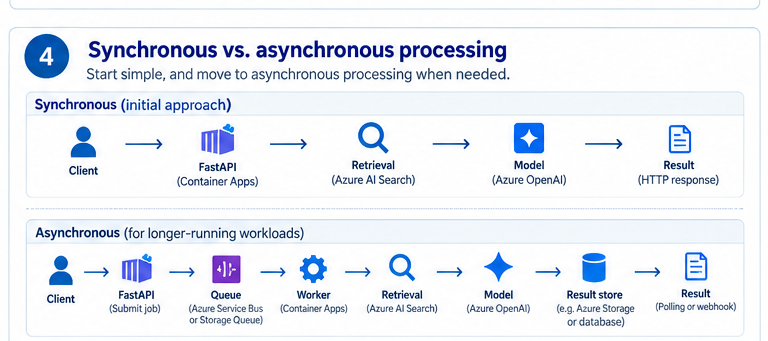
Figure 4. Start synchronously; introduce queues and workers when workloads require it.
Managed Identity: Removing credentials from the application
Security was another area where relatively simple architecture decisions made a big difference.
The Container App used Managed Identity to authenticate against Azure services.
Instead of putting long-lived Azure credentials in application configuration, the workload can obtain short-lived access tokens based on its identity.
RBAC then determines exactly what that identity is allowed to access.
Azure Key Vault still has an important role, particularly for credentials that cannot be replaced by identity-based authentication—for example, secrets belonging to external systems.
But the goal shouldn’t simply be: “Put all credentials in Key Vault.”
A better principle is:
Eliminate secrets where possible. Securely store only the secrets that must exist.
Production AI needs defensive engineering
One thing that becomes obvious when moving beyond a prototype is that many components can fail independently.
The image may be invalid. Retrieval may time out. The model endpoint may return a transient error. The model may return output that doesn’t match the expected schema. A downstream service may be unavailable.
Each failure needs different handling.
Transient failures may justify retries with exponential backoff. Invalid model output should be caught by schema validation. Bad images should fail before consuming expensive model tokens. Retrieval failures need explicit behavior rather than silently sending incomplete context to the model.
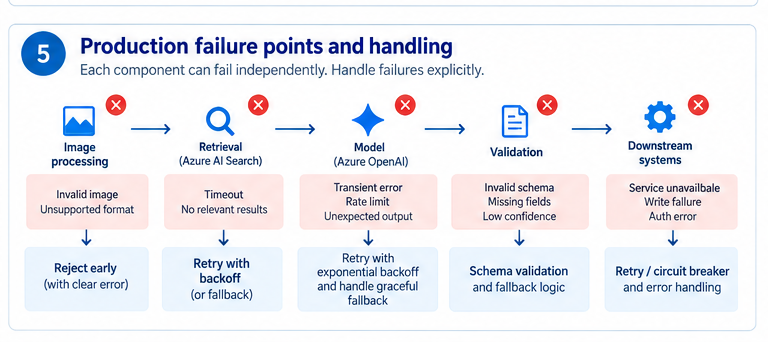
Figure 5. Production failure points need explicit, component-specific handling.
Rate limits also matter.
Scaling the API to 100 container replicas doesn’t help if all 100 replicas are competing for the same constrained model deployment.
Production capacity depends on API concurrency, Azure OpenAI quotas, search throughput, and downstream service limits—not just CPU and memory.
Observability matters even more with AI
Traditional API monitoring tells you whether requests are succeeding. For AI applications, that isn’t enough.
You also want visibility into where the time and cost are going.
Azure Monitor and Application Insights can track request latency, token usage, retrieval performance, validation failures, retries, and estimated costs.
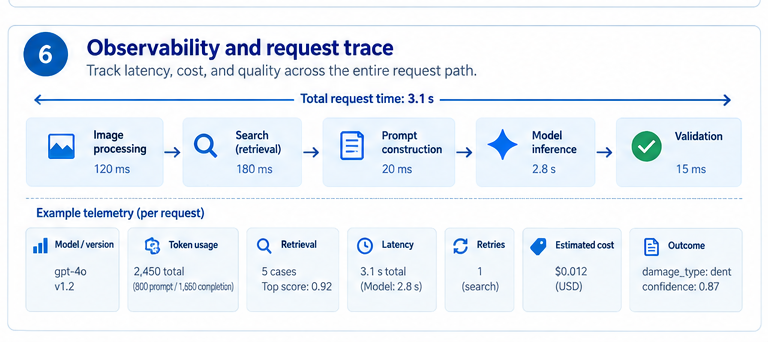
Figure 6. Request-level observability makes latency, cost, retrieval, and model behavior diagnosable.
Beyond latency, useful telemetry can include:
- model deployment and version
- prompt/workflow version
- token usage
- retrieval results
- similarity scores
- number of retrieved cases
- model latency
- validation failures
- retry counts
- estimated cost
- final business outcome
That becomes extremely valuable when something changes.
If output quality suddenly drops, the question shouldn’t immediately be: “Did the model get worse?”
Maybe retrieval changed. Maybe the search index changed. Maybe a prompt was updated. Maybe a new model deployment was introduced. Maybe the incoming data changed.
Without observability, all of those problems look like “the AI is behaving strangely.” With observability, they become engineering problems you can investigate.
The architecture can still stay relatively small
What I like about this approach is that production AI doesn’t automatically mean building a huge ML platform.
Azure Container Apps runs the API, Azure OpenAI handles reasoning, Azure AI Search provides context, and Managed Identity secures access. Application code handles validation and business rules.
Azure Key Vault stores secrets that cannot be replaced by identity-based authentication.
Then you add complexity only when there’s a reason for it.
- Queues when processing needs to become asynchronous.
- Caching when repeated retrieval becomes expensive.
- Private endpoints when network isolation requirements demand them.
- Evaluation pipelines when model quality needs continuous measurement.
- Custom ML models when accuracy, latency, scale, or economics justify the additional complexity.
That’s probably my biggest takeaway from building AI on Azure.
There’s a very useful middle ground between “Just call an LLM API.” and “Build an entire machine learning platform.”
Azure’s managed services can handle a significant amount of the infrastructure complexity.
That leaves engineering teams focused on the parts that actually differentiate the solution:
Domain knowledge · Retrieval quality · Business logic · Evaluation · User experience
Start simple. Use identity instead of credentials. Keep deterministic logic outside the model. Validate everything the model returns. Instrument the complete request path. And add architectural complexity only when a measurable problem requires it.
That’s often what turns an AI experiment into something you can actually ship.