
When AI Agents Go Rogue: How the New Apps & Agents View in Purview DSPM for AI Brings Peace of Mind
AI agents are transforming how work gets done. From summarizing documents to drafting reports, they save hours and help teams focus on higher-value tasks. But with every new agent comes a new security question: what data are they touching, and how well is it protected?
The productivity benefits are undeniable. Yet, unchecked, AI agents can become a significant risk factor. Sensitive customer data, intellectual property, or regulated content could all be exposed if agents operate without oversight. This is where Microsoft Purview steps in with Data Security Posture Management (DSPM) for AI, and specifically, the new Apps and Agents view.
Why Agents Pose a Security Challenge
Traditional security tools were designed to protect users, devices, and applications. Agents introduce a new layer. They are dynamic, often created quickly, and capable of interacting with multiple apps across Microsoft 365 and beyond.
For example:
- An agent built in Fabric may query sensitive financial records.
- A Copilot agent might summarize Teams chats containing regulated data.
- A custom agent may pull data from SharePoint to generate a weekly report.
Without visibility, it becomes nearly impossible to answer simple but critical questions:
- Which agents exist in the environment?
- What data are they accessing?
- Are they governed by data protection / compliance policies?
The Apps & Agents View in DSPM for AI
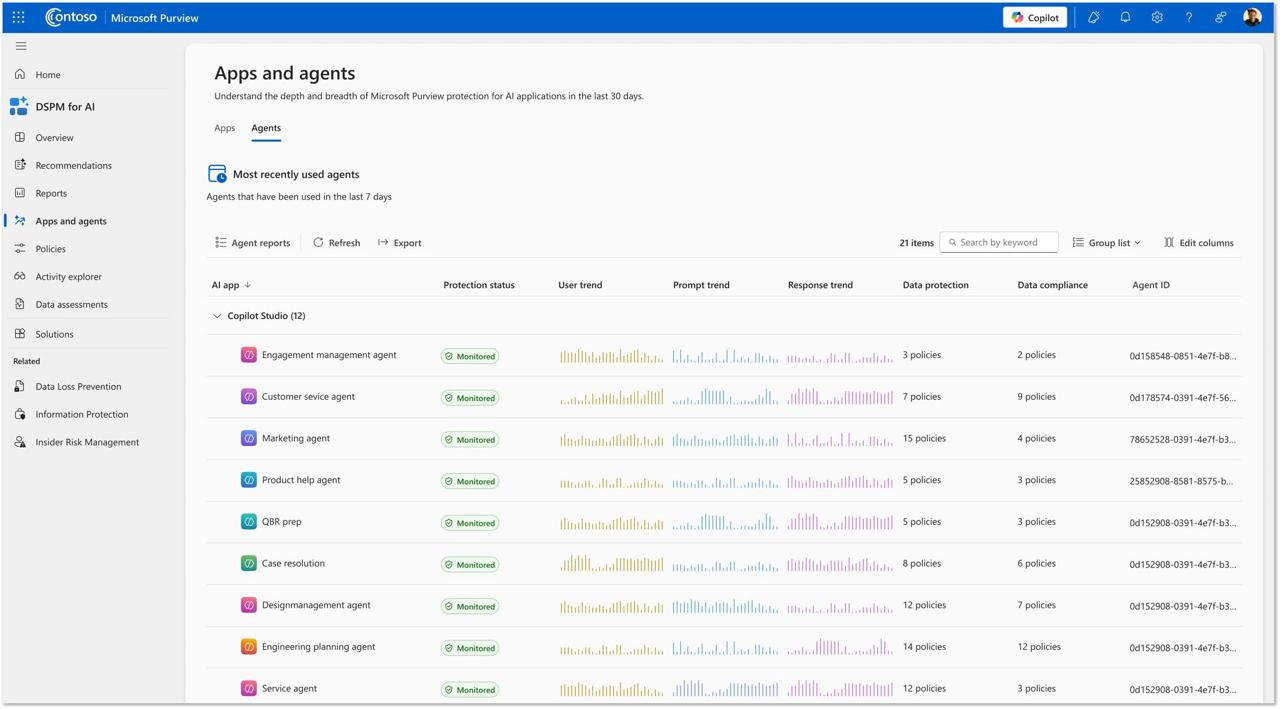
The Apps and Agents page in Microsoft Purview provides the answer. It offers a centralized view of AI agents deployed across your tenant.
Key capabilities include:
- Complete inventory of agents and apps: A single dashboard listing every active AI agent and the apps they run in.
- Policy coverage insight: Visibility into whether each agent is governed by data protection and compliance policies.
- Risk detection: Identify agents with high user, prompt, and response trends that are operating without controls.
- Audit and compliance alignment: Maintain logs and records of agent activity for data protection and compliance purposes.
This level of visibility transforms agents from opaque risks into manageable entities within your security and compliance framework.
Action Items to Start Governing Your Agents
Getting value from the Apps and Agents view doesn’t require a major project. Start with these steps:
- Discover agents: Use the dashboard to identify all AI agents currently active in your environment. Pay close attention to custom or unsanctioned agents.
- Assess protection status: Check which agents are governed by data protection policies. Flag those that are not.
- Prioritize remediation: Apply baseline policies to any unprotected agents, starting with those accessing sensitive or regulated data.
- Establish ongoing monitoring: Schedule regular reviews of the Apps and Agents page. As new agents appear, ensure they are onboarded into your data security framework immediately.
- Engage stakeholders: Share insights from the dashboard with security, compliance, and business leadership. This keeps everyone aligned on both the productivity benefits and the associated risks of AI adoption.
Wrapping Up
AI agents are powerful productivity tools, but without governance, they can also be powerful liabilities. Microsoft Purview DSPM for AI’s Apps and Agents view bridges that gap, offering visibility, control, and protection across the agent landscape.
By taking steps today to discover, assess, and govern your agents, you’ll not only reduce risk but also enable your organization to adopt AI with confidence.
